
Android Canary 2608: Amazing New Quick Settings Editor and App Handles
Android Canary 2608 rolled out on August 6, 2026, and it brings some of the most useful multitasking and customization changes we’ve seen in the Canary channel in months. From a fully editable Quick Settings panel to a clever new way to multitask on foldables, this release gives an early look at where Android is headed later this year.
Here’s a complete breakdown of what’s new in Android Canary 2608, which devices support it, and what it means for the rest of us still on stable Android.
What Is Android Canary 2608?
Android Canary 2608 is the latest build in Google’s Canary channel, tagged CP41.260701.006. Canary is Android’s most experimental release track, sitting even ahead of the Beta channel, and it’s built specifically to give developers and enthusiasts an early look at features long before they reach stable Android. Google itself describes Canary as highly experimental and not recommended for daily use, since builds at this stage can be unstable.
This particular release arrived a month after the previous 2607 build and is described as a lighter, polish-focused update rather than a major feature drop, with stable Android still tracking toward a December 2026 release.
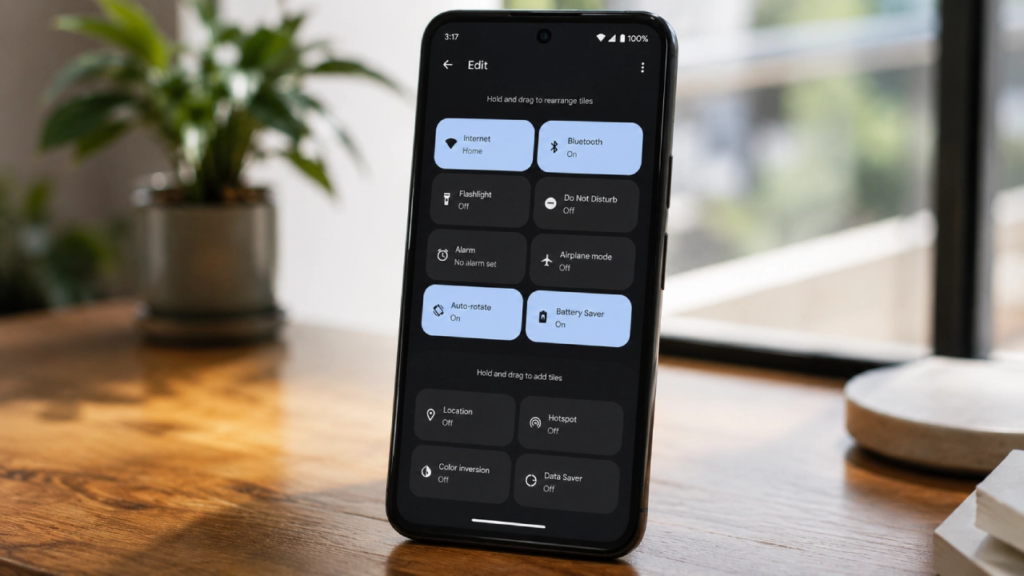
New Quick Settings Layout Editor
The headline feature in Android Canary 2608 is a new Quick Settings editor that gives users real control over how their notification shade looks. For the first time, you’ll be able to reposition the media player relative to your Quick Settings tiles, something Android users have wanted for a long time.
This kind of layout flexibility has been a common request, and its arrival in Android Canary 2608 suggests Google is finally ready to let people organize their quick controls the way they actually want them.
App Handles: A New Multitasking Feature for Foldables
The second major addition in Android Canary 2608 is called “App Handles,” designed specifically with foldable phones in mind. This feature lets you drag a handle to transition a full-screen app straight into split-screen mode, or drag it back to return to full screen, without digging through a multitasking menu.
App bubbles can also be expanded into full screen using the same handle system, making it a genuinely useful upgrade for anyone using a Pixel Fold or similar device.
AI-Generated Lock Screen Clocks
Alongside the multitasking and Quick Settings changes, Android Canary 2608 also includes early UI elements pointing to a future AI-generated lock screen clock feature, which would let users create custom clock designs on their lock screen using AI prompts. This feature isn’t fully live yet in this build, but its presence hints at where Google is heading with on-device AI customization.
Which Devices Support Android Canary 2608?
Android Canary 2608 supports Pixel 6 and newer hardware, including the Pixel 6a, Pixel Tablet, and every Pixel device up through the Pixel 10 series. However, this build marks the final Android Canary release for the Pixel 6 and Pixel 6 Pro specifically. Owners of those two devices will still be able to install this build, but will not receive future Canary updates going forward.
Should You Install Android Canary 2608?
Since Canary sits ahead of even the Beta channel, Google does not recommend it for daily use. It’s aimed at developers and highly technical enthusiasts who want the earliest possible look at upcoming Android changes, bugs and instability included. Most regular users are better off waiting for these features to reach the Beta or stable channel.
For more of the latest technology updates, check out our Technology section regularly.
Frequently Asked Questions
What is new in Android Canary 2608?
Android Canary 2608 introduces a customizable Quick Settings layout editor, a new “App Handles” multitasking feature for foldables, and early UI elements for AI-generated lock screen clocks.
Which devices support Android Canary 2608?
It supports Pixel 6 and newer devices, including the Pixel 6a, Pixel Tablet, and all Pixel phones up to the Pixel 10 series, though it is the final Canary build for the Pixel 6 and Pixel 6 Pro.
Is Android Canary 2608 safe to install on a daily driver phone?
No. Google describes the Canary channel as highly experimental and not recommended for daily use, since builds can be unstable.
When will Android Canary 2608 features reach stable Android?
Stable Android is currently tracking toward a December 2026 release, though features seen in Canary builds can still change before then.
What is the difference between Android Canary and Beta?
Canary sits ahead of the Beta channel and represents the earliest, most experimental look at upcoming Android features, while Beta builds are comparatively more polished and closer to a stable release.

Pingback: L&T NVIDIA B300 AI Factory: Amazing 10,000-GPU Deal Worth Rs. 15,000 Crore - NovaKhabar
Pingback: GTA Plus Gallivanter Warden: Amazing Free SUV Worth $1.6 Million - NovaKhabar
Pingback: WhatsApp Polling Improvements: Amazing 3 New Features Now Rolling Out - NovaKhabar
Pingback: OnePlus 16 Leaks: Official Specs Reveal Terrible News for Western Fans - NovaKhabar