
WhatsApp Restricted Chats Android Beta: Official New Privacy Lock
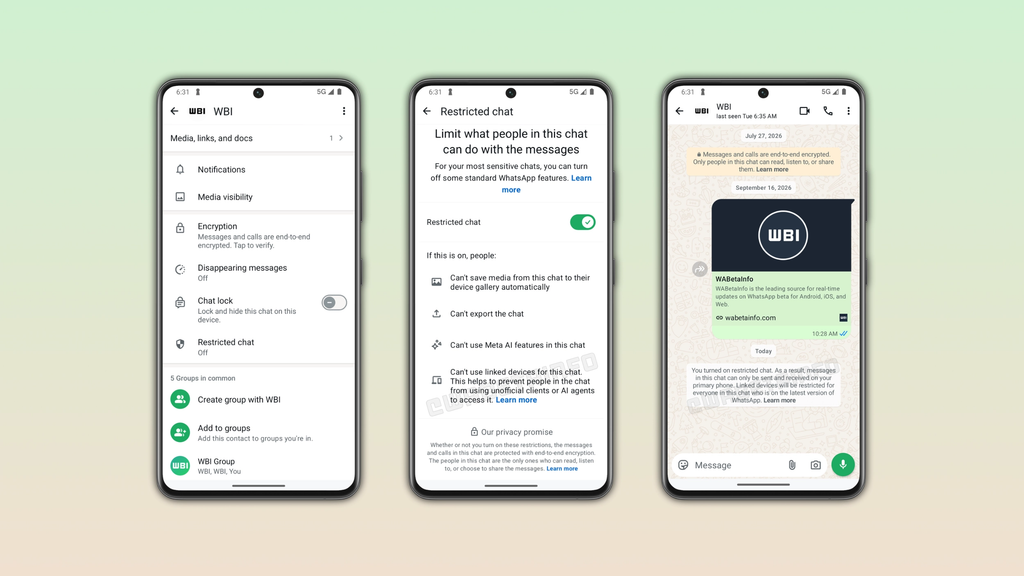
WhatsApp Restricted Chats Android Beta is a new per-conversation lock, live on beta version 2.26.39.11 through a limited, phased Google Play rollout, that keeps a selected chat on your primary phone only, blocking it from syncing to WhatsApp Web, desktop sessions, or any other linked device entirely.
Once you turn it on for a chat, media from that conversation stops auto-saving to your phone’s gallery, you can no longer export its history, and Meta AI features get disabled inside it, though the feature currently only works on one-on-one chats, not groups. It’s worth not confusing this with the existing Chat Lock feature, which hides a chat behind a fingerprint or Face ID but still syncs normally across every linked device.
What Is WhatsApp Restricted Chats Android Beta?
WhatsApp Restricted Chats Android Beta is a per-conversation privacy setting that confines a specific chat to your primary phone, so it never appears on WhatsApp Web, desktop, or any secondary device linked to your account.
This matters because WhatsApp’s multi-device feature, while convenient, has always meant that anyone who opens your linked WhatsApp Web session could see all your conversations. WhatsApp Restricted Chats Android Beta gives you a way to carve out specific sensitive conversations that simply never leave your phone, regardless of how many devices are linked to your account.
How Is Restricted Chat Different From Chat Lock?
Restricted Chat and Chat Lock solve two different privacy problems, and WhatsApp is keeping both features rather than replacing one with the other.
Chat Lock, available since 2023, hides a conversation behind a separate folder that requires your fingerprint or Face ID to open, but that locked chat still syncs normally to WhatsApp Web and any linked devices. Restricted Chat works the opposite way, it doesn’t hide the chat behind extra authentication on your phone, but it stops the conversation from syncing anywhere else at all. For maximum privacy on a specific conversation, the two features can likely be used together once Restricted Chat is fully released.
How to Turn On WhatsApp Restricted Chats Android Beta
WhatsApp Restricted Chats Android Beta is disabled by default and has to be turned on individually for each chat you want to protect.
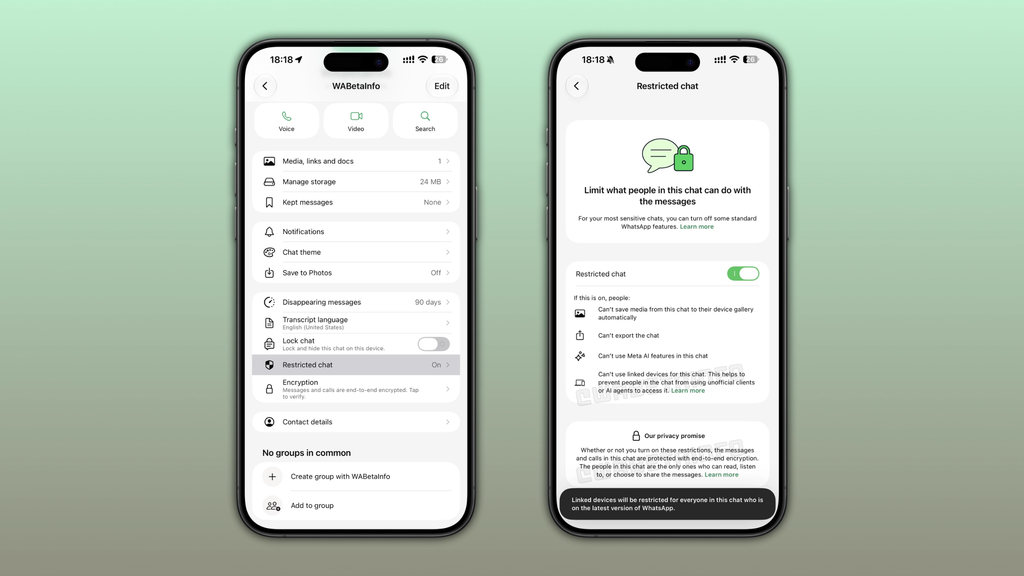
Open the WhatsApp conversation you want to restrict, tap the contact’s name at the top of the screen to open the Chat Info screen, and toggle on Restricted Chat. The setting applies only to that one conversation, so there’s no single switch to restrict every chat on your account at once. WABetaInfo’s own coverage confirms this per-chat rollout pattern matches how WhatsApp typically tests privacy features before a wider release. Our earlier coverage of the WhatsApp Android app navigation redesign looked at another recent interface change rolling out through the same beta channel.
What Changes When You Turn On Restricted Chat?
Turning on Restricted Chat changes more than just where the conversation appears, it also removes a few conveniences within that specific chat.
Photos and videos sent or received in a restricted chat will no longer automatically save to your phone’s camera roll, which is useful if you don’t want sensitive images building up in your gallery app. You also lose the ability to export that chat’s history, and Meta AI features won’t work inside a restricted conversation at all. These trade-offs are clearly intentional, each one closes a way that restricted content could otherwise leak outside the single device it’s meant to stay on.
Is Restricted Chat Available to Everyone Yet?
No, Restricted Chat is currently limited to a small set of WhatsApp Android beta testers, and WABetaInfo has noted that not every beta tester will see it immediately even after updating.
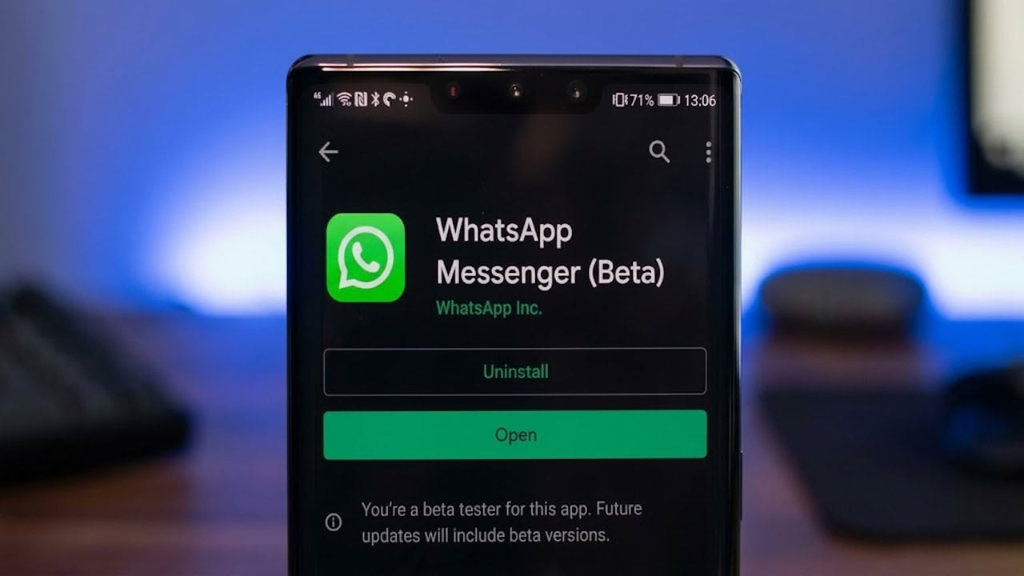
This phased rollout pattern is standard for WhatsApp features during testing, features typically expand to more beta testers over several weeks before a wider stable release. WhatsApp has not announced any confirmed date for when Restricted Chat will reach the regular, non-beta version of the app. If you want early access, joining the WhatsApp Beta Program through the Google Play Store is the only way to potentially get it sooner, though even that doesn’t guarantee immediate access given the limited rollout.
Is Restricted Chat Coming to iPhone Too?
Yes, there are reports that WhatsApp has also begun testing a version of Restricted Chat on iOS beta, so this isn’t an Android-only feature long term.
As with the Android rollout, the iOS version appears to be in early, limited testing, and WhatsApp hasn’t confirmed a timeline for either platform’s stable release. Given how closely WhatsApp usually keeps its Android and iOS feature timelines aligned for major privacy features, it’s reasonable to expect both versions to reach general availability within a similar window. For more on recent WhatsApp feature rollouts, check out our Technology section.
Frequently Asked Questions
Can other people in the chat tell that I’ve turned on Restricted Chat?
WhatsApp has not confirmed whether the other person in a restricted conversation sees any indicator that the chat has been restricted on your end.
Does Restricted Chat work on group chats?
No, as of the current beta rollout, Restricted Chat only works on individual one-on-one conversations, not group chats.
Will I lose my old chat history if I enable Restricted Chat on an existing conversation?
WhatsApp has not detailed exactly how existing chat history is handled when Restricted Chat is turned on for an already-active conversation, since the feature is still in limited beta testing.
Is Restricted Chat the same as WhatsApp’s disappearing messages feature?
No, disappearing messages automatically delete messages after a set time on every device, while Restricted Chat keeps messages permanently but confines them to a single phone.
Do I need the latest WhatsApp beta version to see this feature?
Yes, you need WhatsApp Android beta version 2.26.39.11 or later from the Google Play Beta Program, and even then the feature may not appear immediately due to the phased rollout.
